Making a PDF more accessible is only part of the job.
The next question is just as important:
How do you verify that the output actually conforms to PDF/UA?
That is why we added built-in PDF/UA validation to DocEngine.
DocEngine is designed to post-process existing PDF documents and improve their accessibility. It analyzes document structure, enriches semantics, and helps turn visually correct PDFs into documents that are also understandable for assistive technologies.
Now the workflow goes one step further.
After processing a document, DocEngine can validate the result against PDF/UA-1 using veraPDF, a well-known open-source validator for PDF/A and PDF/UA conformance.
That means validation is no longer a separate manual step done in another tool. It becomes part of the same SaaS workflow that processes the document.
Why this matters
PDF accessibility is not only about whether a document looks fine on screen.
Accessible PDFs need machine-readable structure: headings, paragraphs, tables, lists, metadata, language settings, annotations, alternative text, and a logical reading order that assistive technologies can interpret correctly.
PDF/UA (ISO 14289) provides a concrete standards-based baseline for that.
For organizations producing large numbers of PDFs — invoices, customer letters, statements, policies, reports, and archived communications — validation cannot depend on opening documents one by one in a desktop tool.
It has to fit into the production workflow.
That is the practical value of this feature.
Validation inside the DocEngine workflow
With the new validation capability, users can see the result directly inside DocEngine after processing a PDF.
Instead of exporting the file, opening another application, running a manual validation, and interpreting raw output, they get a clear report in the same environment.
The validation view answers the questions that matter first:
- Is the document PDF/UA compliant?
- How many checks passed?
- Were any errors found?
- Which validation categories were inspected?
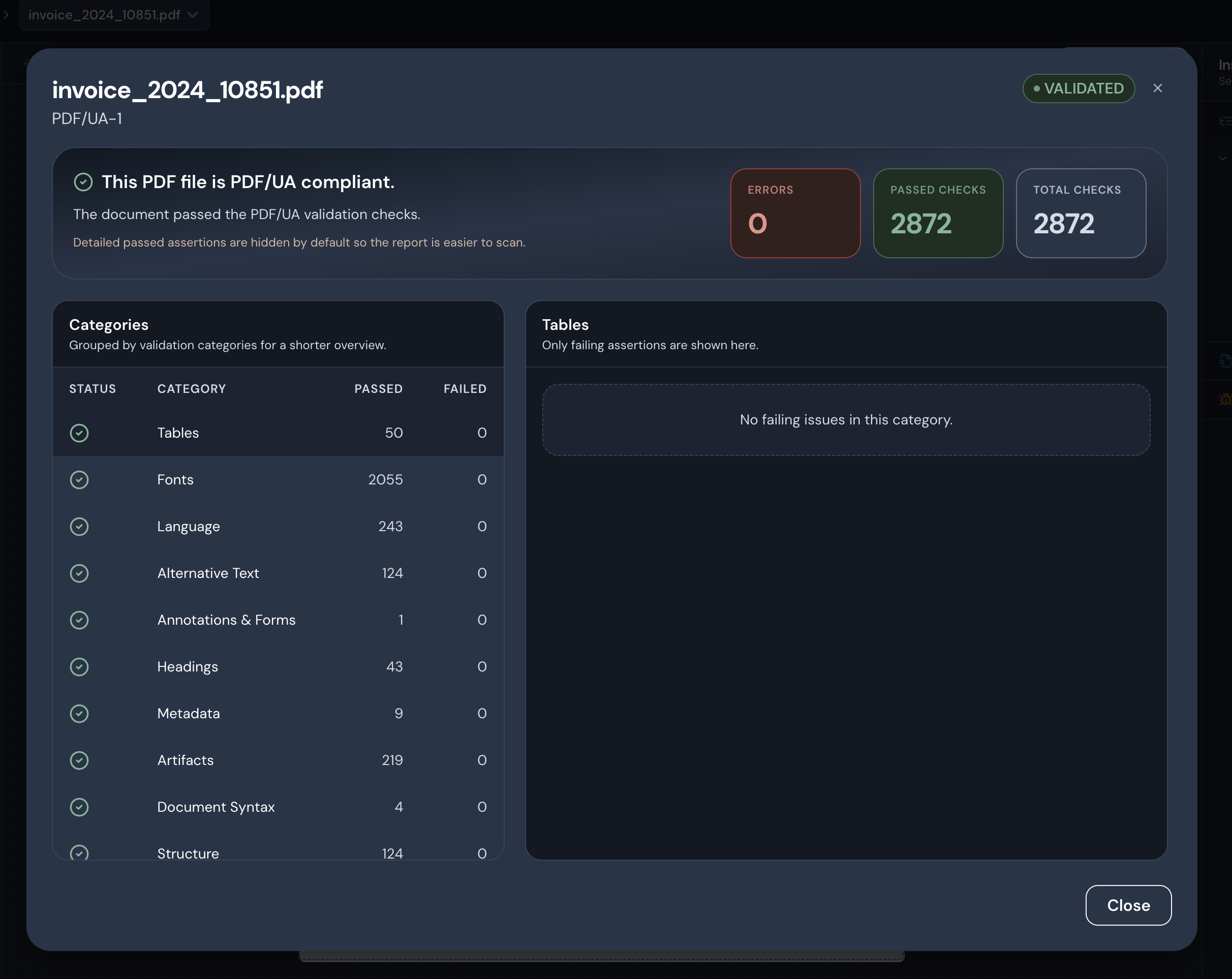
Example validation result in DocEngine: a processed invoice is reported as PDF/UA-1 compliant, with zero errors and all 2,872 checks passing.
For technical teams, this provides a standards-based quality signal.
For business users, it provides a simple verdict they can understand without reading a low-level validator report.
From remediation to proof
This is the part I find especially useful.
A lot of accessibility tooling focuses either on remediation or on validation. In real production environments, those two things belong together.
If you improve a document but cannot verify the result, the workflow is incomplete.
If you validate a document but the validation sits outside the operational flow, teams often skip it until late in the process.
By embedding validation directly into DocEngine, the feedback loop becomes much tighter:
- Process the PDF
- Validate the result
- Inspect the report
- Move forward with more confidence
That is a better fit for high-volume document operations than treating validation as a separate expert-only activity.
Standards-based, not a black box
DocEngine uses veraPDF for the validation step.
That matters because the result is grounded in an established open-source validator rather than a proprietary score or vague “accessibility health” indicator.
veraPDF is widely known in the PDF standards and preservation space, and PDF/UA itself is part of the ISO 14289 family of accessibility standards for PDF.
Of course, passing PDF/UA validation is not the whole accessibility story. Human review still matters. Content clarity still matters. Color contrast, wording, and the actual usefulness of alternative text still matter.
But automated validation is an essential baseline, especially when PDFs are produced at scale.
Why embedded validation is different
The main difference is not just that validation exists.
It is that validation is available out of the box inside the DocEngine SaaS workflow.
That reduces friction for teams that want accessibility checks to be part of normal operations rather than a separate specialist task.
In practice, that means:
- less context switching between tools,
- faster feedback after processing,
- clearer reporting for users,
- and a more operational way to handle accessible document production.
For teams working with large PDF volumes, that is much closer to how accessibility needs to work in reality.
What this enables next
Built-in validation makes it easier to think about PDF accessibility as an engineering workflow, not just a final review step.
That opens the door to stronger quality control, more reliable document pipelines, and better operational visibility into accessibility outcomes.
For me, that is the real direction here:
not just making PDFs more accessible, but making accessibility easier to verify, operationalize, and trust.
If you are working with accessible customer communication, archived documents, or large-scale PDF production, this is exactly the kind of capability that should live inside the workflow — not outside it.