We added built-in PDF/UA validation to DocEngine because a processed PDF still needs an independent conformance check.
DocEngine post-processes existing PDFs to improve their accessibility. It analyzes the structure, adds semantics, and produces documents that assistive technology can understand.
After processing, DocEngine validates the result against PDF/UA-1 with veraPDF, an open-source PDF/A and PDF/UA validator.
Validation now runs in the same workflow as the document processing.
What PDF/UA validation checks
A document can look fine on screen while its machine-readable structure is incomplete or wrong.
Accessible PDFs need machine-readable headings, paragraphs, tables, lists, metadata, language settings, annotations, alternative text, and reading order.
PDF/UA, ISO 14289, defines a baseline for that structure.
For large document volumes, validation cannot depend on opening each PDF in a desktop tool. It has to run in production.
Validation inside the DocEngine workflow
After DocEngine processes a PDF, the user sees the validation result in the same place. There is no export to another validator and no separate report to find later.
The validation view reports:
- Is the document PDF/UA compliant?
- How many checks passed?
- Were any errors found?
- Which validation categories were inspected?
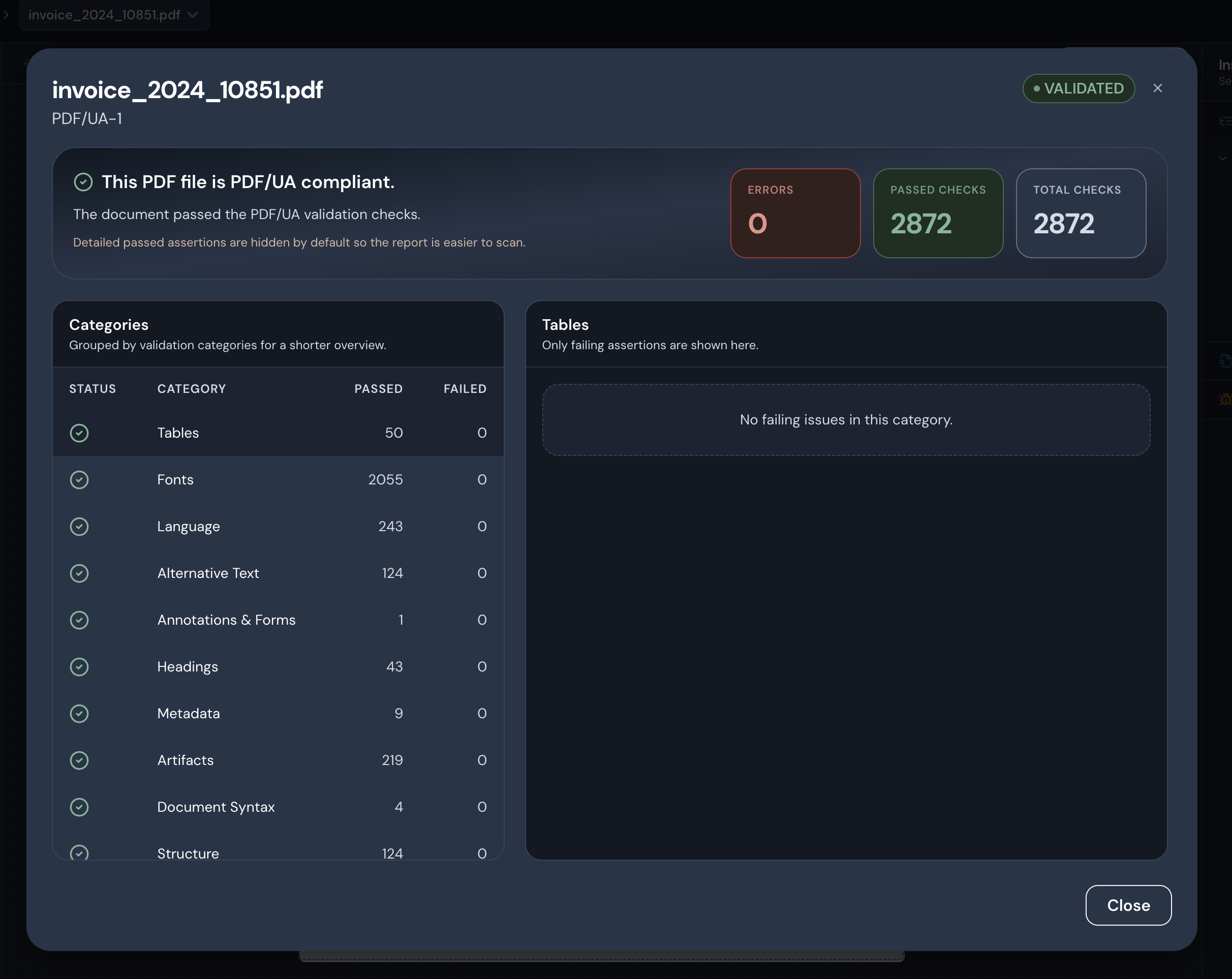
Example validation result in DocEngine: a processed invoice is reported as PDF/UA-1 compliant, with zero errors and all 2,872 checks passing.
Technical teams can inspect the failed rules. Business users can see the verdict without reading raw veraPDF output.
From remediation to validation
Accessibility tools often handle remediation or validation. Production needs both.
If the team cannot verify a remediated document, the workflow is incomplete. If validation sits outside production, it is easy to skip until late in the process.
DocEngine keeps the processing and validation steps together:
- Process the PDF
- Validate the result
- Inspect the report
- Decide whether the document can move to the next stage
This sequence can run for every document instead of relying on a late manual check.
Standards-based validation
DocEngine uses veraPDF for the validation step.
The result comes from veraPDF and the PDF/UA rules, not a proprietary accessibility score.
Passing PDF/UA does not prove that the document is useful to every reader. Human review still needs to check content clarity, color contrast, wording, and alternative text.
Automated validation gives production a repeatable baseline.
Why validation runs inside DocEngine
Validation runs inside the DocEngine processing workflow so it can be part of normal operations.
In practice, teams get:
- less context switching between tools,
- faster feedback after processing,
- clearer reporting for users,
- a repeatable validation step in document production.
The validator does not replace human review. It gives the production team a reproducible result after every processed document, with failed checks next to the output.